
The finite element analysis software landscape has transformed dramatically, with open-source solutions now delivering professional-grade capabilities that rival commercial packages costing tens of thousands annually. This guide explores the best free FEA program options available, providing insights into free FEA tools, installation methods, and practical implementation strategies for computational simulations in aerospace, civil engineering, and structural analysis applications. The finite element method (FEM) has been democratized through robust open-source alternatives, breaking free from expensive licensing constraints and offering the power and precision needed for demanding engineering projects.
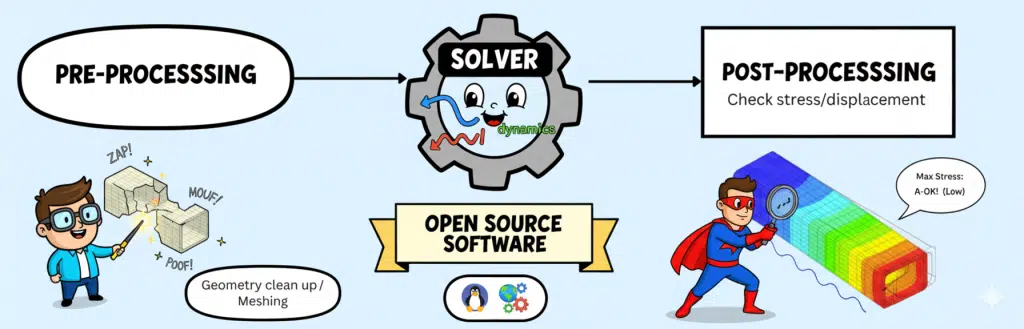
Table of Contents
Introduction: Understanding Open Source FEA Software
The Rising Cost of Commercial Finite Element Analysis Software
Free finite element analysis software has democratized engineering simulation, transforming professional-grade computational tools from expensive exclusives into universally accessible resources. A free FEA program now enables engineers worldwide—from graduate students to startups to independent consultants—to perform sophisticated structural, thermal, and multiphysics analyses without costly licensing fees. This open-source revolution doesn’t just eliminate financial barriers; it accelerates innovation through global collaboration, where thousands of contributors continuously improve solver capabilities and expand engineering possibilities. The tools are free, the capability is professional-grade, and the only limit is your imagination.
Let’s face it – if you’re exploring free FEA options, you’ve likely experienced sticker shock from commercial finite element analysis software quotes. With annual licenses for packages like ANSYS or LS-DYNA often exceeding $25,000 per seat, plus maintenance fees that grow yearly, it’s no wonder engineers are seeking open-source alternatives.
After two decades working with FEM software, I’ve watched small firms struggle with these costs while brilliant researchers abandon projects when simulation software licenses consumed their budgets. The good news? Today’s best free FEA solutions have matured significantly.
Major automotive manufacturers now use open source FEA solvers for crash simulation. NASA incorporates these finite element tools into spacecraft design. Nuclear facilities rely on free finite element analysis software for safety-critical thermal analysis and structural analysis.
What This Guide to free FEA Programs Delivers
This comprehensive list of finite element packages isn’t just another software roundup. You’ll discover exactly how to evaluate, install, and implement open-source solver tools that genuinely replace commercial analysis software for many applications.
Whether you’re running 2D and 3D simulations, tackling nonlinear problems, or exploring multi-physics coupling, you’ll find actionable strategies. We’ll cover everything from basic finite element method implementations to advanced computational fluid dynamics integration.
Defining Free and Open-Source FEA Software
Before diving into specific FEM packages, let’s clarify what “free” means in the finite element software context. Open source software provides source code access, modification rights, and community contribution opportunities. This includes powerful solver engines and complete simulation platforms. Free software might be closed-source freeware or freemium models with node limit restrictions.
Today’s best open-source packages employ the same finite element method fundamentals, partial differential equations solvers, and numerical algorithms as commercial counterparts. They handle everything from basic linear and nonlinear static analysis to complex fluid-structure interaction and solving partial differential equations for heat transfer.
Core Components of Modern FEM Software
Essential Elements: Pre-processor, Solver, and Post-processor
Every finite element analysis workflow requires three fundamental components, whether using commercial or free FEA software.
The pre-processor handles geometry definition, mesh generation, and boundary condition application. Modern preprocessors like Gmsh offer adaptive mesh refinement and parametric modeling capabilities. The solver transforms your physical problem into matrices, handling everything from simple static and dynamic analysis to complex PDEs.
The post-processor visualizes results through contour plots, animations, and graphs. Tools like ParaView excel at post-processing for open-source software, handling massive datasets from high-performance computing runs.
Critical Features for Simulation Software
When evaluating FEA programs, certain capabilities distinguish professional tools from educational software.
Linear and nonlinear analysis forms the foundation. Your chosen finite element software must handle solid mechanics, thermal analysis, and ideally computational fluid dynamics. Modern engineering demands nonlinear capabilities for large deformations, plasticity, and contact mechanics.
Multi-physics simulations require coupling between different physics modules. Whether you’re modeling heat transfer with structural deformation or tackling fluid-structure interaction, pre-built physics templates accelerate setup.
Professional FEM Requirements
Professional finite element analysis software needs robust validation against benchmarks, comprehensive documentation, and CAD integration. Python scripting capabilities enable automation and parametric studies.
For high-performance applications, look for scalable solvers supporting parallel computing. Libraries like PETSc provide the backbone for many open-source solver implementations, enabling efficient high-performance computing on clusters.
Comprehensive Review: Best Free FEA Software Packages
CalculiX: Professional Open-Source Solver for Nonlinear Analysis
CalculiX stands as a cornerstone of the open-source FEA community. This powerful solver handles everything from basic structural analysis to complex nonlinear problems with contact mechanics and plasticity.
The software excels at both static and dynamic analysis, supporting thermal simulations and coupled thermo-mechanical problems. CalculiX reads Abaqus input files directly, significantly easing migration from commercial tools. Performance scales impressively—models with 2D and 3D geometries exceeding 2 million degrees of freedom run efficiently on standard workstations.
CalculiX includes solvers for both implicit and explicit computations. For nonlinear problems, it implements robust algorithms handling buckling analysis, large deformations, nonlinear material behavior, and complex contact mechanics. The explicit dynamic solver tackles impact and crash simulations effectively. Thermal analysis and heat transfer capabilities include coupled thermomechanical solutions that match industry standards, with robust convergence algorithms for solid mechanics problems.
CalculiX’s native interface (CGX) is functional but dated, lacking the polish of modern commercial tools. Many users prefer pairing CalculiX with external pre-processing and post-processing tools. Popular workflows combine CalculiX with Gmsh for mesh generation and ParaView for visualization, creating a powerful, modern free FEA program environment. However, this approach requires familiarity with multiple software packages and, for advanced usage, good knowledge of FEA concepts and Abaqus input file syntax.
PrePoMax: User-Friendly Interface for CalculiX
PrePoMax has converted countless engineers to free FEA by providing a modern, intuitive GUI for the CalculiX solver. This combination delivers professional-grade capabilities with significantly reduced learning curve compared to using CalculiX directly.
The interface handles mesh generation, boundary condition definition, and post-processing seamlessly within a single environment. It excels at simplifying nonlinear analysis setup, making contact mechanics and plasticity accessible to engineers without extensive FEA expertise. The built-in post-processor with color-coded stress visualization eliminates the need for external tools like ParaView.
PrePoMax supports standard CAD file formats (STEP, IGES, STL) for geometry import and includes integrated meshing capabilities. The graphical interface uses familiar windows and menus that feel similar to commercial FEA software, dramatically lowering the barrier to entry. Users can define materials, loads, and boundary conditions through dialog boxes rather than editing text files.
While PrePoMax greatly simplifies CalculiX usage, external CAD software is still recommended for complex geometry creation. Some advanced CalculiX features may require command file editing. However, for the majority of structural, thermal, and nonlinear analyses, PrePoMax provides a complete, user-friendly free FEA solution that rivals commercial packages costing thousands of dollars annually.
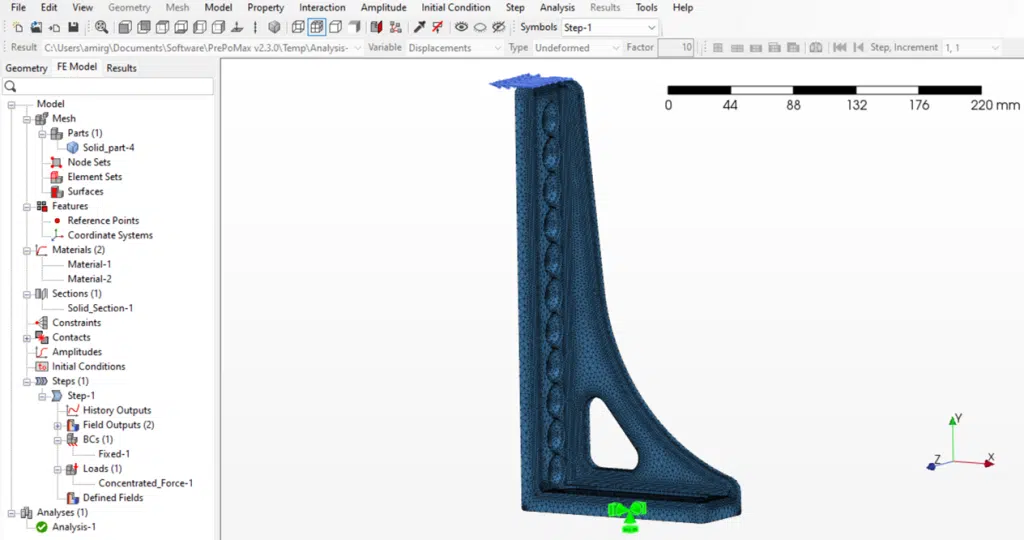
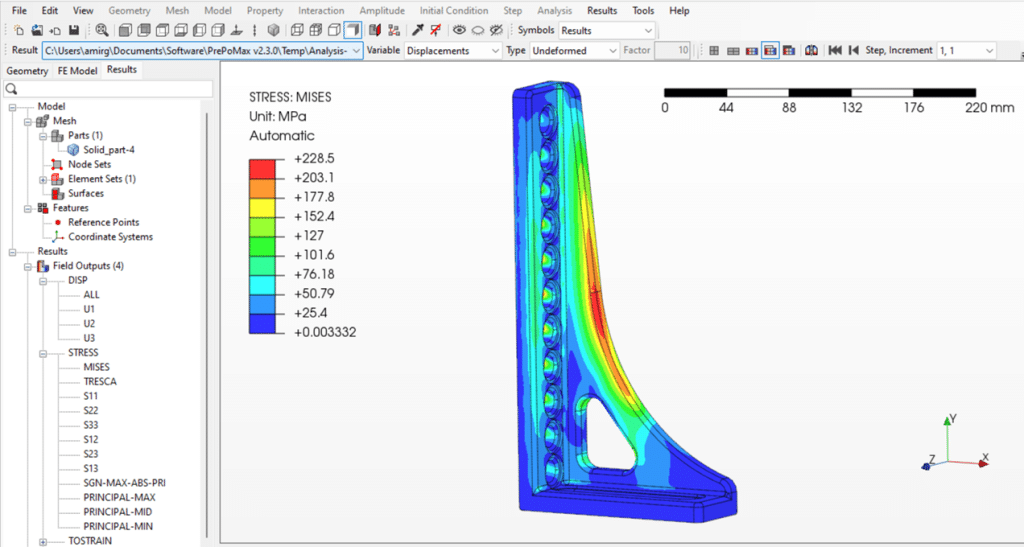
Figure 1 – Stress analysis simulation of a cast bracket under load using CalculiX, a free FEA program, displayed in PrePoMax interface
Code_Aster/Salome: Nuclear-Grade Multiphysics Platform
Code_Aster represents the pinnacle of free finite element analysis capability. Developed by EDF for France’s nuclear industry, this simulation software rivals any commercial offering in depth and validation.
Code_Aster is the powerful solver engine, while Salome-Meca provides the complete user environment by bundling Code_Aster with the Salome platform for pre-processing and post-processing. The AsterStudy GUI within Salome-Meca manages simulation workflows, creating an integrated analysis environment.
Code_Aster excels at multiphysics problems with pre-built modules for seismic analysis, fatigue, fracture mechanics, and thermal analysis including radiation and phase change. With over 400 element types and 200+ material laws, it handles virtually any computational challenge. Advanced capabilities include phase field methods for fracture mechanics, level set techniques for interface tracking, adaptive mesh refinement, high-order finite elements, and sophisticated contact mechanics. The comprehensive eigenvalue analysis supports modal and buckling predictions, while specialized physics modules cover applications from seismic analysis to concrete aging.
Salome-Meca provides robust meshing capabilities and geometry tools that support numerous 3D file formats for easy CAD import. The adaptive mesh refinement ensures optimal discretization for complex geometries. For high-performance computing applications, parallel computing capabilities scale efficiently to hundreds of processors.
While Salome-Meca offers a complete free FEA program environment, new users face challenges. The interface can feel overwhelming initially due to numerous icons and features, creating a steep learning curve—especially for those without a strong FEA background. The most significant barrier for international users is that much documentation and many error messages remain in French, though English translations continue to improve. Some advanced functionalities require manual configuration and command-file editing. However, for engineers willing to invest the learning time, Code_Aster delivers nuclear-grade analysis capabilities unmatched in the open-source world.


Figure 2 – Temperature distribution analysis of a valve component simulated in Salome-Meca & Code-Aster, a free FEA program
Elmer FEA: Scalable Multiphysics with ElmerGUI
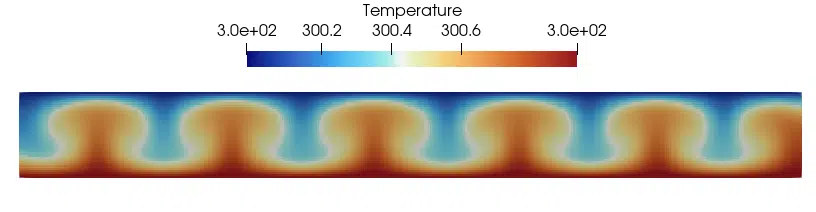
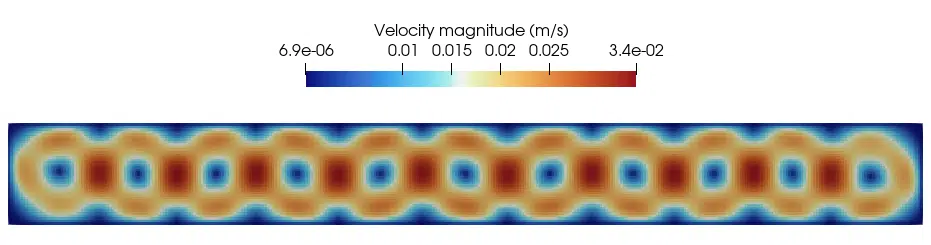
Elmer stands out as a free FEA program specifically designed for multiphysics simulations requiring high-performance computing. Where most finite element software excels at one type of analysis, Elmer’s architecture enables seamless coupling of multiple physics domains simultaneously.
Elmer’s defining capability is solving coupled problems where multiple physics modules interact naturally. Electromagnetics coupled with thermal effects represents its core strength—ideal for applications like induction heating, motor design, and electromagnetic devices where thermal management is critical. The software efficiently solves Navier-Stokes equations for computational fluid dynamics while simultaneously handling heat transfer through sophisticated radiation and phase change models.
For complex engineering scenarios, Elmer tackles fluid-structure interaction, electromagnetic-thermal-mechanical coupling, and porous media flow with specialized solvers optimized for each physics type. This makes it invaluable for applications ranging from geophysical simulations to biomedical device modeling.
The parallel computing implementation scales efficiently to hundreds of processors, making Elmer suitable for both desktop workstations and supercomputer clusters. Written primarily in Fortran with some C++, the software maintains computational efficiency while supporting various finite element types and modern numerical methods including multigrid solvers, Krylov subspace methods, discontinuous Galerkin formulations, and adaptive mesh refinement for accurate resolution of field gradients.
ElmerGUI provides relatively intuitive access to complex physics setups, allowing users to configure multiphysics problems through dialog boxes rather than editing solver input files directly. However, as a free FEA solution, Elmer has some practical limitations. The software lacks built-in geometry modeling and advanced mesh generation tools, requiring external software like Gmsh or Salome for these preprocessing steps. Some advanced solver features aren’t fully exposed through the GUI, necessitating direct input file editing for specialized applications.
Elmer assumes users have solid familiarity with finite element concepts and the underlying partial differential equations governing their physics. The documentation, while comprehensive, can lag behind the latest solver capabilities. For engineers willing to invest the learning time and comfortable working with multiple software tools, Elmer offers multiphysics capabilities in the open-source space that are difficult to match—particularly for electromagnetic and thermal coupling problems.
FreeFEM: Advanced PDE Solver with Custom Language
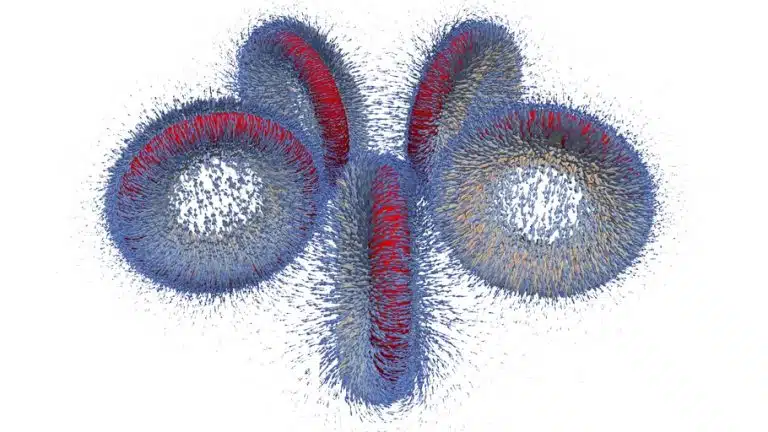
FreeFEM deserves special mention for engineers comfortable with programming. This solver uses the FreeFEM language to define and solve partial differential equations directly, offering unmatched flexibility for custom physics.
The software excels at solving partial differential equations using variational formulations. It handles Navier-Stokes equations for CFD, level set methods for interface tracking, and electromagnetics problems. The continuous and discontinuous Galerkin methods provide flexibility for different problem types.
FreeFEM supports 2D and 3D problems with adaptive mesh refinement and time-dependent simulations. For multi-physics applications including fluid-structure interaction, its scripting approach enables complex coupling scenarios.
FEniCS: Python-Powered Finite Element Analysis
FEniCS transforms finite element analysis through Python automation. This modern approach to FEM offers distinct advantages.
Automatic differentiation for Jacobian generation eliminates tedious manual derivation. The Python interface enables seamless integration with scientific computing libraries. Boundary conditions are specified naturally through mathematical expressions. Integration with PETSc provides robust parallel computing capabilities for high-performance applications.
The platform handles complex PDEs with ease, from linear and nonlinear elasticity to phase field models. For researchers implementing custom physics, FEniCS provides unmatched flexibility. The software supports parametric studies through Python scripting, enabling extensive design exploration.
OpenFOAM: CFD Excellence with Fluid-Structure Interaction
While OpenFOAM is fundamentally a computational fluid dynamics (CFD) tool rather than a traditional free FEA program, its fluid-structure interaction capabilities make it essential for engineers dealing with coupled fluid-solid problems. This open-source solver represents the gold standard for complex flow simulations in the free software ecosystem.
OpenFOAM excels at solving the Navier-Stokes equations with sophisticated turbulence models including k-epsilon, k-omega SST, Large Eddy Simulation (LES), and Direct Numerical Simulation (DNS). The software handles multiphase flows (liquid-gas, liquid-liquid), combustion modeling, heat transfer in fluids, and conjugate heat transfer where fluid and solid thermal analysis are coupled. These capabilities make it invaluable for applications ranging from aerospace aerodynamics to heat exchanger design.
For engineers working on fluid-structure interaction problems—such as flexible structures in flowing fluids, aeroelasticity, or biomedical applications—OpenFOAM couples with structural solvers like CalculiX through frameworks like preCICE. This combination enables true multiphysics simulations where fluid forces deform structures, which in turn affect the fluid flow. Examples include wind loading on buildings, blood flow through flexible arteries, and valve dynamics in engines.
OpenFOAM includes native meshing utilities: blockMesh for simple structured meshes and snappyHexMesh for complex geometries from surface files (STL, OBJ formats). The software also imports meshes from third-party generators like Gmsh or Salome. Visualization relies on ParaView, which seamlessly handles OpenFOAM’s native output formats and provides powerful post-processing capabilities for flow visualization including streamlines, velocity vectors, and scalar fields.
OpenFOAM’s parallel computing implementation scales efficiently from desktop workstations to supercomputer clusters with thousands of processors. This scalability, combined with support for complex geometries and adaptive meshing, makes it suitable for industrial-scale simulations.
OpenFOAM has a notoriously steep learning curve. The software uses a case directory structure with text-based configuration files rather than a graphical interface. Users must understand CFD fundamentals, meshing principles, and numerical schemes. However, several third-party GUIs like HELYX-OS and simFlow provide more accessible interfaces. For engineers willing to invest the learning time, OpenFOAM delivers world-class CFD capabilities that complement traditional free FEA tools for comprehensive multiphysics analysis.
FreeCAD FEM Workbench: Integrated CAD and Simulation
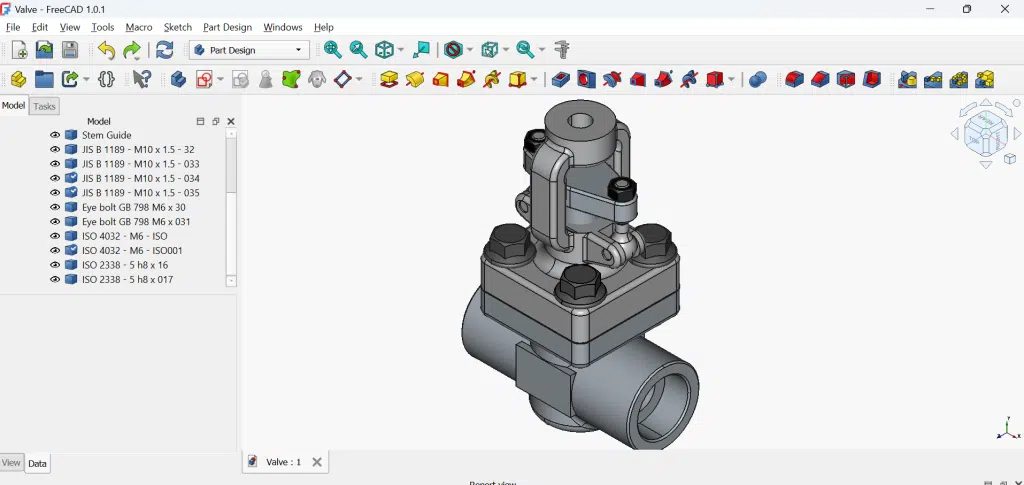
FreeCAD’s FEM Workbench revolutionizes the finite element software workflow by integrating CAD with analysis. This parametric approach enables design optimization studies where geometry changes automatically update the mesh and analysis.
The workbench interfaces with multiple open-source solver options including CalculiX, Elmer, and Z88. This flexibility lets you choose the best solver for specific simulation needs while maintaining a consistent GUI experience.
MOOSE Framework: Advanced Multiphysics Development
The MOOSE Framework provides infrastructure for developing specialized multiphysics applications. Built for complex coupling scenarios, it offers flexible architecture for implementing custom physics modules. It supports discontinuity capturing and adaptive mesh refinement. The framework includes specialized applications like BISON for nuclear fuel performance. It features an extensive verification and validation suite ensuring solver reliability.
Additional Notable FEM Software Packages
The list of finite element tools extends beyond mainstream options:
Gmsh provides exceptional mesh generation with parametric capabilities and Python scripting. It integrates with most open-source solver packages.
ParaView dominates post-processing for open source FEA, handling massive datasets from parallel computing runs with advanced visualization options.
Deal.II offers a high-performance library for custom FEM development, supporting adaptive mesh refinement and high-order finite element methods.
PETSc provides scalable linear algebra routines underlying many solver implementations, crucial for high-performance computing applications.
Free FEA Software Installation and Configuration
System Requirements for Simulation Software
Before installing free finite element analysis tools, ensure adequate hardware. While minimum requirements suggest 8GB RAM, real FEM work demands 16-32GB for serious mesh sizes and nonlinear analyses.
High-performance computing benefits from modern multi-core processors. For parallel computing, more cores directly reduce solver time. Explicit dynamic analyses and time-dependent simulations generate substantial data, requiring fast SSDs for working files.
Linux offers optimal performance for most open-source software, particularly for computational fluid dynamics and multiphysics applications. Ubuntu and Debian provide excellent compatibility with FEA programs.
Installing CalculiX with PrePoMax
For Windows users, PrePoMax includes the CalculiX solver, simplifying installation. The integrated package provides immediate access to linear and nonlinear analysis capabilities with professional GUI features.
Linux users can compile for optimal high-performance on their specific hardware. The compilation process, while initially daunting, yields significant performance improvements for large non-linear problems.
Configuring Salome-Meca Platform
Salome-Meca bundles Code_Aster with complete pre/post-processing tools. The universal binary includes all dependencies for thermal analysis, structural analysis, and multi-physics simulations.
The platform uses environment modules managing complex dependencies for Python scripting, mesh generation, and ParaView integration. Proper configuration enables parallel computing for scalable analysis on clusters.
Setting Up Elmer with ElmerGUI
Elmer installation includes ElmerGUI for user-friendly access to multiphysics capabilities. The setup process configures solver modules for various physics domains including heat transfer, electromagnetics, and solid mechanics.
Configure parallel computing through MPI for high-performance computing applications. The ElmerGUI simplifies mesh import from Gmsh and boundary condition application for complex PDEs.
FreeFEM Configuration for PDE Solutions
FreeFEM installation provides immediate access to the FreeFEM language for custom partial differential equations solving. The package includes examples demonstrating variational formulations for diverse problem types.
Configure the environment for 2D and 3D problems with appropriate visualization tools. The adaptive mesh refinement capabilities require proper memory allocation for large-scale computational problems.
Performance Benchmarks and Feature Comparison
Computational Efficiency of Open-Source Solvers
Benchmark testing across free FEA software packages reveals comparable accuracy to commercial alternatives. For standard NAFEMS tests, most open source FEA tools achieve sub-1% error rates.
Solver efficiency varies with problem type. For linear and nonlinear static problems, CalculiX and Code_Aster excel. Elmer demonstrates superior scalable performance for multiphysics applications on high-performance computing clusters.
Explicit dynamic analyses favor specialized solvers, while implicit methods suit time-dependent problems with heat transfer or creep. Memory usage scales predictably with problem size, though iterative solvers reduce requirements for large sparse systems.
Feature Matrix: FEM Software Capabilities
Comparing finite element software capabilities helps selection:
Mesh generation and adaptive mesh refinement varies significantly. Gmsh offers the most flexible meshing, while FreeFEM provides automatic adaptation for PDEs.
Physics modules coverage differs: Elmer leads in multiphysics, Code_Aster excels at solid mechanics with fracture, FreeFEM dominates custom PDE implementation, and OpenFOAM rules computational fluid dynamics.
Post-processing options range from built-in (PrePoMax) to external (ParaView). Most packages support standard visualization formats enabling workflow flexibility.
Selection Framework for FEA Programs
Matching Simulation Requirements to Software
Selecting appropriate finite element analysis software requires honest requirement assessment.
For basic structural analysis with linear and nonlinear materials, PrePoMax with CalculiX provides an excellent starting point. The user-friendly interface accelerates productivity while maintaining professional capabilities.
Thermal analysis combined with structures points toward Code_Aster or Elmer. Both handle coupled thermo-mechanical problems with heat transfer through conduction, convection, and radiation.
CFD and fluid-structure interaction demands specialized tools. OpenFOAM excels at pure computational fluid dynamics, while Elmer provides integrated multiphysics including fluids.
Custom PDEs or novel physics require FreeFEM’s flexibility. The FreeFEM language enables rapid prototyping of new finite element method formulations for research applications.
Organizational Considerations for Open Source FEA
Team adoption of free finite element analysis tools requires planning. Consider learning curves: PrePoMax gets engineers productive quickly, while Code_Aster mastery takes months.
Python scripting capabilities enable automation and standardization across teams. Most open-source software supports Python for parametric studies and workflow automation.
For high-performance computing environments, prioritize scalable solvers like Elmer or Code_Aster with proven parallel computing efficiency.
Best Practices for Professional FEM Analysis
Verification and Validation Procedures
Professional finite element analysis demands rigorous verification regardless of software package choice. Run standard benchmarks validating solver accuracy for your problem types.
Implement mesh convergence studies systematically. Start coarse, refine progressively, and plot results versus element count. Convergence indicates sufficient discretization for accurate simulation.
Document validation against analytical solutions, experimental data, or previous commercial software results. This builds confidence in open source FEA adoption for critical applications.
Workflow Optimization with Python and Automation
Python scripting transforms FEM software productivity. Automate mesh generation, parametric studies, and post-processing workflows. All major free FEA packages support Python integration.
Create reusable templates for common analyses. Whether modeling heat transfer, nonlinear buckling, or contact mechanics, templates ensure consistency and reduce setup time. Implement version control for simulation files, scripts, and results. This enables collaboration and provides traceability for regulated industries.
Future of Open-Source Finite Element Software
Emerging Trends in FEA Programs
The finite element software landscape evolves rapidly. Machine learning integration promises automatic mesh optimization and error estimation. GPU acceleration will democratize large-scale nonlinear analysis and explicit dynamic simulations.
Cloud-based simulation software platforms emerge regularly. Browser-based access to open-source solver tools eliminates installation complexities while providing scalable computing resources.
Adaptive mesh refinement algorithms improve continuously, reducing computational costs while maintaining accuracy. Real-time simulation becomes feasible for increasingly complex problems.
Growing Adoption of Free FEA Solutions
Industry acceptance of open source FEA accelerates. Automotive suppliers use CalculiX for production design validation. Civil engineering firms adopt Code_Aster for seismic analysis. Universities transition to free finite element analysis tools for education and research. Regulatory bodies increasingly accept open-source software analyses. FDA approvals using FEM tools like FEBio demonstrate growing credibility. Nuclear regulators’ acceptance of Code_Aster opens doors for critical applications.
Conclusion: Selecting Your Optimal FEA Software Package
Recommended Starting Points by Application
After extensive experience with every major free FEA platform, here are targeted recommendations:
Beginners: Start with PrePoMax for user-friendly access to professional CalculiX capabilities. The modern GUI and excellent documentation accelerate learning.
Research applications: FreeFEM offers unmatched flexibility for custom PDEs and novel finite element method implementations. The FreeFEM language enables rapid prototyping.
Industrial multiphysics: Elmer with ElmerGUI provides comprehensive physics modules for coupled simulations including heat transfer, electromagnetics, and fluid-structure interaction.
Large-scale structural analysis: Code_Aster through Salome delivers nuclear-grade validation with scalable parallel computing for millions of degrees of freedom.
CFD-dominant problems: OpenFOAM remains unmatched for computational fluid dynamics with selective structural coupling needs.
Week 1: Install your chosen finite element software. Run tutorials covering basic linear and nonlinear analyses. Join community forums for support.
Week 2: Recreate a known problem comparing results with analytical solutions or previous simulation software. Validate mesh convergence and solver accuracy.
Week 3: Apply the FEM tool to a real project. Start with simplified geometry and physics, progressively adding complexity like contact mechanics or thermal analysis.
Week 4: Explore automation through Python scripting. Implement parametric studies and customize post-processing workflows.
Essential Resources
Maximize your open source FEA journey with these resources:
- PrePoMax forum for CalculiX support and user-friendly guidance
- FreeFEM documentation for PDE formulation and solving partial differential equations
- Elmer tutorials covering multiphysics and parallel computing
- Gmsh guides for advanced mesh generation with adaptive mesh refinement
- ParaView resources for professional post-processing and visualization
The transformation from expensive commercial licenses to powerful free finite element analysis tools is complete. These open-source solver packages deliver professional capabilities for structural analysis, thermal analysis, CFD, and multiphysics simulations.
Yes, learning open-source software requires investment. But the freedom to run unlimited simulations without license constraints, customize solver behavior, and leverage high-performance computing without per-core fees? That’s revolutionary for FEA accessibility.
The finite element method community thrives on collaboration. Every question answered, bug reported, and script shared strengthens these free FEA software packages. Your contributions today enable tomorrow’s innovations.
Start your open source FEA journey today. The tools await, the community welcomes newcomers, and your engineering challenges deserve unlimited computational freedom.
Frequently Asked Questions (FAQ)
Can a free FEA program genuinely substitute for costly commercial solutions like ANSYS or Abaqus?
For numerous standard engineering analyses—including linear/nonlinear structural assessments, thermal evaluations, and eigenvalue calculations—free FEA tools deliver comparable accuracy to commercial alternatives. Code Aster’s certification for nuclear facility design validates its professional-grade performance. Nevertheless, commercial platforms maintain edges in interface refinement, niche capabilities such as explicit dynamics modeling, and streamlined integrated processes. Leading open-source options provide excellent core finite element analysis functionality while demanding more hands-on workflow management.
Which free FEA program offers the easiest learning curve for newcomers?
FreeCAD’s FEM Workbench presents the most approachable starting point through its combined CAD and analysis platform. Its graphical interface delivers familiar processes for engineers transitioning from commercial systems. Salome-Meca packages Code-Aster with extensive pre-processing and post-processing tools, forming a complete, user-oriented solution. Both feature GUI environments that reduce command-line requirements while teaching essential FEM principles.
What hardware specifications are needed to operate free FEA software effectively?
Most free FEA program options function efficiently on conventional workstations. Models containing fewer than 500,000 nodes require 16-32GB RAM paired with any contemporary processor. High-performance computing features in Elmer and Code-Aster scale to supercomputer infrastructures for extremely large simulations. Linux delivers optimal performance, while Windows users attain near-equivalent speeds through WSL2. Parallel processing capabilities frequently surpass commercial alternatives since licensing doesn’t restrict processor core utilization.
How can multiphysics challenges be addressed using open-source simulation platforms?
Elmer provides integrated multiphysics coupling for electromagnetics, thermal transport, and fluid dynamics. For fluid-structure interaction scenarios, pair OpenFOAM with CalculiX via the preCICE coupling library. The MOOSE framework manages intricate custom partial differential equations and multiphysics situations. FEniCS facilitates rapid coupled-physics development through Python programming. Selection depends on whether you require prebuilt physics modules or custom implementation adaptability.
Is professional technical support obtainable for open-source FEA solutions?
Professional assistance exists for major open-source platforms. Code-Aster maintains certified training partners and consultants globally. Various companies provide supported distributions featuring additional capabilities and service guarantees. Support expenses typically cost 50-70% below commercial software maintenance fees. Numerous consulting firms specialize in open-source solver deployment, delivering training, customization, and continuous support.
Can Python scripting be utilized with these finite element applications?
Most contemporary free FEA solutions support Python automation. FEniCS operates entirely through Python for solving partial differential equations. Gmsh provides comprehensive Python APIs for parametric mesh creation. Code Aster incorporates Python for workflow automation. ParaView enables scripted post-processing and visualization. This Python compatibility facilitates powerful automation, optimization investigations, and integration with machine learning platforms.
What methodology works best for validating free FEA results?
Begin by solving benchmark problems with established analytical solutions. Cross-reference results across multiple open-source solver platforms for verification. Validate against experimental data when accessible. Document all modeling assumptions and simplifications. Establish peer review procedures for mission-critical analyses. Many platforms include comprehensive verification test suites for reference. Developing systematic validation methodologies ensures confidence in open-source finite element analysis outcomes regardless of software selection.
References (clickable):
CalculiX
- Official Website: CalculiX
- Documentation: CalculiX docs (dhondt.de)
- Download Page: CalculiX downloads (dhondt.de)
- GitHub Repository (Community): calculix on GitHub
- User Forum: CalculiX Discourse
Salome-Meca & Code_Aster
- Code_Aster Official Website: code-aster.org
- Salome Platform: salome-platform.org
- Documentation: Code_Aster docs
- Download Page: Code_Aster downloads
- GitLab Repository: codeaster on GitLab
- User Forum: Code_Aster forum
Elmer FEM
- Official Website: Elmer FEM
- Documentation: Elmer docs
- GitHub Repository: ElmerCSC/elmerfem
- Download Page: Elmer binaries
- Community Forum: Elmer forum
FreeFEM
- Official Website: FreeFEM
- Documentation: FreeFEM docs
- GitHub Repository: FreeFem/FreeFem-sources
- Download Page: FreeFEM releases
- Community Discourse: FreeFEM community
OpenFOAM
- Official Website (Foundation): openfoam.org
- OpenFOAM.com (ESI): openfoam.com
- Documentation: OpenFOAM docs (ESI)
- User Guide: OpenFOAM User Guide (CFD Direct)
- GitHub Repository: OpenFOAM/OpenFOAM-dev
- Community Forum: CFD Online OpenFOAM forum
FEniCS
- Official Website: FEniCS Project
- Documentation: FEniCS docs
- GitHub Repository: FEniCS on GitHub
- FEniCSx (New Version): FEniCS/dolfinx
- Tutorial: FEniCSx tutorial
- Discourse Forum: FEniCS Discourse
FreeCAD
- Official Website: FreeCAD
- FEM Workbench Documentation: FreeCAD wiki: FEM Workbench
- Download Page: FreeCAD downloads
- GitHub Repository: FreeCAD/FreeCAD
- User Forum: FreeCAD forum
MOOSE Framework
- Official Website: MOOSE
- Documentation: MOOSE docs
- GitHub Repository: idaholab/moose
- Getting Started: MOOSE getting started
- Examples: MOOSE examples
- Discussion Forum: MOOSE discussions on GitHub
Gmsh
- Official Website: Gmsh
- Documentation: Gmsh reference manual
- Download Page: Gmsh downloads
- GitLab Repository: gmsh on GitLab
- Tutorials: Gmsh tutorials
- Issue Tracker: Gmsh issue tracker